
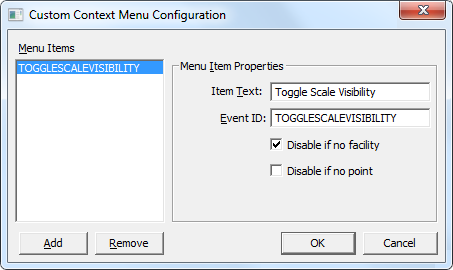
The following configuration screen allows a screen builder to create, name and edit the context menu options for each menu to be displayed on the right-click menu. The screen examples shown below are common to both Standard context menus and Custom context menus, although the menu item options differ.
| Property | Description |
|---|---|
|
Menu Items |
Items that will be added at the bottom of the right-click context menu in runtime in CygNet Studio. |
|
Add |
Adds a new menu item to the list to be added to the runtime right-click context menu. |
|
Remove |
Removes an item from the Menu Items list and the runtime right-click context menu. |
| Menu Item Properties | |
|
Item Text |
Enter the name to be displayed in the runtime right-click menu. |
|
Event ID |
Specifies the Event ID that will be called when the item is selected from the runtime right-click context menu. See Standard Context Menus or Custom Context Menus for more information about this property. |
|
Disable on invalid tag |
Disables the menu item if the associated point is an invalid tag string for the item selected in the control. |
|
Disable always |
Always disable the menu item for the item selected in the control. |
|
Disable if no facility |
Disables the menu item if no facility is present for the item selected in the control. |
|
Disable if no point |
Disables the menu item if no point is present for the item selected in the control. |
You can override the following standard CygNet context menu items using the listed CygNet Menu IDs:
| Context Menu Item | Actual Menu Text | Associated CygNet Menu IDs |
|---|---|---|
|
Acknowledge Alarm |
Acknowledge Alarm Acknowledge the Current Alarm |
CYG_ALARMACK |
| Command Info… |
Command Info… Edit the command info |
CYG_EDITCOMMANDINFO |
|
Command State… |
Command State… View the command state |
CYG_COMMANDSTATE |
| Configuration… |
Configuration… View Current Configuration |
CYG_VIEWCONFIG |
|
Current Value… |
Current Value… Show current value |
CYG_PROPERTIES |
|
Facility Configuration |
Facility Configuration |
CYG_TOOLFACILITY |
|
Facility Configuration... |
Facility Configuration… |
CYG_VIEWFACILITY |
|
History |
||
|
Alarm History |
Alarm History View alarm history |
CYG_HIST_ALARM |
|
History Values |
History Values View alarm history |
CYG_HIST_VAL |
|
Point Configuration |
||
|
Alarm Settings… |
Alarm Settings… View/Edit Alarm Settings… |
CYG_ALARMSETTINGS |
|
Alarm Suppression… |
Alarm Suppression… View/Edit Alarm Suppression… |
CYG_ALARMSUPPRESSION |
|
All Settings… |
All Settings… Edit All… |
CYG_POINTCONFIG |
|
Comments… |
Comments… View/Edit Comments… |
CYG_COMMENT |
|
Questionable State… |
Questionable State… View/Edit Questionable Flag… |
CYG_QUESTIONABLE |
|
Point List… |
Point List… View point list |
CYG_POINTLIST |
|
SetPoint Configuration |
SetPoint Configuration… View the SetPoint configuration |
CYG_SETPOINTCONFIG |
|
Show History Playback Bar |
Show History Playback Bar |
CYG_HISTORYPLAYBACKBAR |
|
Tool Configuration… |
Tool Configuration… View the Tool Configuration… |
CYG_TOOLCONFIG |
|
Trend |
||
|
Add to Default Trend |
Add to Default Trend Add this point to the default trend |
CYG_ADDTODEFAULTTREND |
|
Remove from Default Trend |
Remove from Default Trend Remove this point from the default trend |
CYG_REMOVEFROMDEFAULTTREND |
|
Single Point |
Show Single Point Trend Single Point |
CYG_SINGLEPOINT |
|
Single Point with Rollups |
Show Single Point Trend with Rollups Single Point With Rollups |
CYG_SINGLEPOINTROLLUP |
|
Update Rate |
Change the View Update Rate Change Update Rate |
CYG_UPDATERATE |
|
View Trend |
View Trend View the default trend for this view |
CYG_TREND |
To remove a menu item from a context menu, you must use script, for example:
|
Sub TheView_EventInitialize() Dim This : Set This = TheView This.RemoveObjectMenuItem "CYG_ALARMSUPPRESSION" End Sub |

|
|
|


